\(~~~~~~~~~~\)Text Mining\(~~~~~~~~~~\)
Asst. Prof. Dr. Somsak Chanaim
International College of Digital Innovation, CMU
October 15, 2026
Learning Objectives
By the end of this chapter, students are able to…
Explain the basic concepts of Text Mining, NLP, and a text corpus.
Match common NLP applications with their practical benefits.
Distinguish among Standard Sentiment Analysis, Fine-Grained Sentiment Analysis, Emotion Detection, and Aspect-Based Sentiment Analysis.
Explain the main steps of rule-based sentiment analysis: tokenization, stopword removal, keyword identification, and sentiment classification.
Distinguish the training and prediction stages of machine-learning-based sentiment analysis.
Interpret sentiment scores, word clouds, Bag of Words, and word-count vectors.
What is Text Mining

Text Mining (also called Text Data Mining or Text Analytics) is the process of extracting useful information, patterns, and knowledge from unstructured text data.
It combines techniques from natural language processing (NLP), machine learning, and statistics to transform text into structured data for analysis.
Application of Text Mining
Applications of Text Mining
Text Mining can be applied to many types of unstructured text data.
| Domain | Typical Text Data | Main Tasks |
|---|---|---|
| 🛍 Business | Customer reviews | Sentiment, topics, keywords |
| 🏥 Healthcare | Clinical notes, medical reports | NER, classification |
| 💰 Finance | News, reports, complaints | Sentiment, NER |
| 🎓 Education & Research | Essays, forums, articles | Similarity, summarization |
Common Idea
Different domains use different text sources, but the goal is similar:
Text Data → Text Mining Technique → Insight → Decision / Action
NER = Named Entity Recognition
🛍 Business: Customer Review Analysis
Scenario: An e-commerce company receives thousands of customer reviews every day. The goal is to understand what customers like, dislike, and frequently discuss.
📄 Text Data
- Product reviews
- Customer feedback
- Social media comments
- Support messages
🔍 Text Mining Tasks
Sentiment Analysis → Positive / Neutral / Negative
Topic Modeling → Delivery, price, quality
Keyword Extraction → Frequently discussed issues
💡 Business Action
- “late delivery” → investigate logistics problems
- “battery problem” → review product quality
- “great packaging” → identify product strengths
🏥 Healthcare: Mining Clinical Text
Scenario: Hospitals generate large amounts of unstructured medical text that may contain important information about diseases, symptoms, treatments, and patient risks.
📄 Text Data
- Clinical notes
- Discharge summaries
- Radiology reports
- Medical records
🔍 Text Mining Tasks
Named Entity Recognition (NER) → Diseases, symptoms, treatments
Text Classification → Categorize clinical documents
Pattern Mining → Discover common relationships
🩺 Healthcare Applications
- Clinical decision support
- Patient-risk identification
- Medical-record summarization
- Detection of recurring health patterns
💰 Finance: Mining Financial Text
Scenario: Financial organizations analyze large volumes of news, reports, and textual records to identify useful signals and potential risks.
📄 Text Data
- Financial news
- Analyst reports
- Earnings-call transcripts
- Customer complaints
- Transaction descriptions
🔍 Text Mining Tasks
Sentiment Analysis → Market or company sentiment
Named Entity Recognition (NER) → Companies, people, financial entities
Text Classification → Categorize reports or suspicious text
Topic Analysis → Emerging financial themes
📈 Applications
- Market sentiment monitoring
- Fraud investigation support
- News analysis
- Earnings-call analysis
🎓 Education & Research
Scenario: Universities and researchers work with large amounts of textual information, including student work, discussions, and academic publications.
📄 Text Data
- Student assignments
- Discussion forums
- Open-ended responses
- Research articles
🔍 Text Mining Tasks
Text Similarity → Identify similar documents
Summarization → Generate concise article summaries
Sentiment / Topic Analysis → Analyze student feedback
Text Classification → Categorize responses or documents
📚 Applications
- Academic integrity support
- Learning analytics
- Student-feedback analysis
- Literature analysis
Comparing Text Mining Applications
| Domain | Text Data | Main Techniques | Example Insight |
|---|---|---|---|
| 🛍 Business | Customer reviews | Sentiment, Topic Modeling | Customer complaints |
| 🏥 Healthcare | Clinical notes | NER, Classification | Diseases and symptoms |
| 💰 Finance | News, reports | Sentiment, NER | Market sentiment |
| 🎓 Education | Essays, forums | Similarity, Classification | Learning patterns |
Key Takeaway
The text-mining workflow is similar across domains,
but the data, analytical task, and interpretation depend on the problem.
\[ \text{Text} \rightarrow \text{Numerical Representation} \rightarrow \text{Analysis} \rightarrow \text{Insight} \]
NLP Applications and Their Benefits
The mock exam may ask you to match an NLP task with its practical benefit.
| NLP Task | Main Purpose | Example Benefit |
|---|---|---|
| Spam Detection | Classifies unwanted or suspicious email | Helps manage inboxes efficiently |
| Voice Search | Converts speech into a search/query action | Supports hands-free control of devices |
| Machine Translation | Translates text or speech between languages | Enables real-time multilingual communication |
| Chatbot | Automatically responds to user questions | Reduces waiting time for product/order inquiries |
Exam Tip
Focus on the purpose of each task. For example, Voice Search is about speech-based interaction, while Chatbots are about conversational responses.
Text Corpus
A text corpus is a collection of written or spoken texts assembled for language analysis or machine-learning tasks.
A useful corpus should represent the kind of real-world language relevant to the problem. Researchers can use corpora to study language patterns and to train or evaluate text-mining models.
Do Not Confuse
A text corpus is not simply a public library collection. It is a dataset of language samples prepared for analysis.
Natural Language Processing
Natural Language Processing (NLP) is a field of artificial intelligence (AI) that focuses on enabling computers to understand, interpret, and generate human language (spoken or written).
It combines techniques from linguistics, computer science, and machine learning to bridge the gap between human communication and computer understanding.
Key Capabilities of NLP
- Text Preprocessing → Tokenization, stemming, lemmatization, stop-word removal.
- Text Classification → Spam detection, sentiment analysis, topic labeling.
- Named Entity Recognition (NER) → Identifying people, places, dates, organizations in text.
- Machine Translation → Google Translate, DeepL.
- Sentiment Analysis → Detecting emotions (positive, negative, neutral) in text.
- Speech Recognition → Turning speech into text (e.g., Siri, Alexa).
- Text Generation → Chatbots, large language models (chatGPT, Gemini ✨).
Sentiment analysis
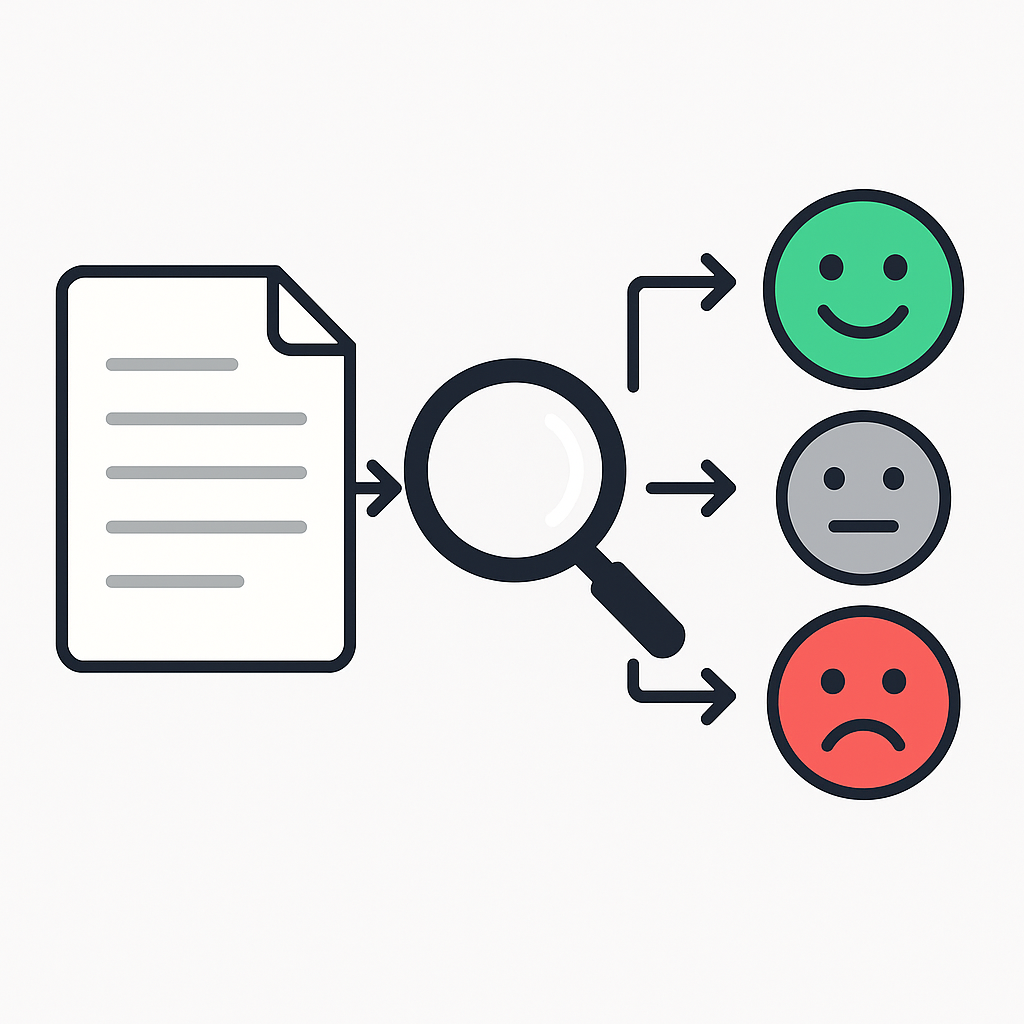
Sentiment Analysis is a text-mining technique used to identify the polarity or attitude expressed in text. A common task is to classify text as positive, negative, or neutral. More advanced approaches may also estimate sentiment intensity, emotions, or sentiment toward specific aspects.
Example Sentence and Sentiment Value
Some sentiment-analysis systems assign a sentiment score to text.
A common normalized scale is –1 (very negative) to +1 (very positive), but there is no universal sentiment-score scale. Different tools may use labels, probabilities, raw lexicon scores, or other scoring systems.
Sentence:
“The movie was fantastic and inspiring.”
- Sentiment Value: +0.85 (strongly positive)
Sentence:
“The service was terrible and disappointing.”
- Sentiment Value: –0.80 (strongly negative)
Sentence:
“The food was okay, nothing special.”
- Sentiment Value: 0.05 (neutral / slightly positive)
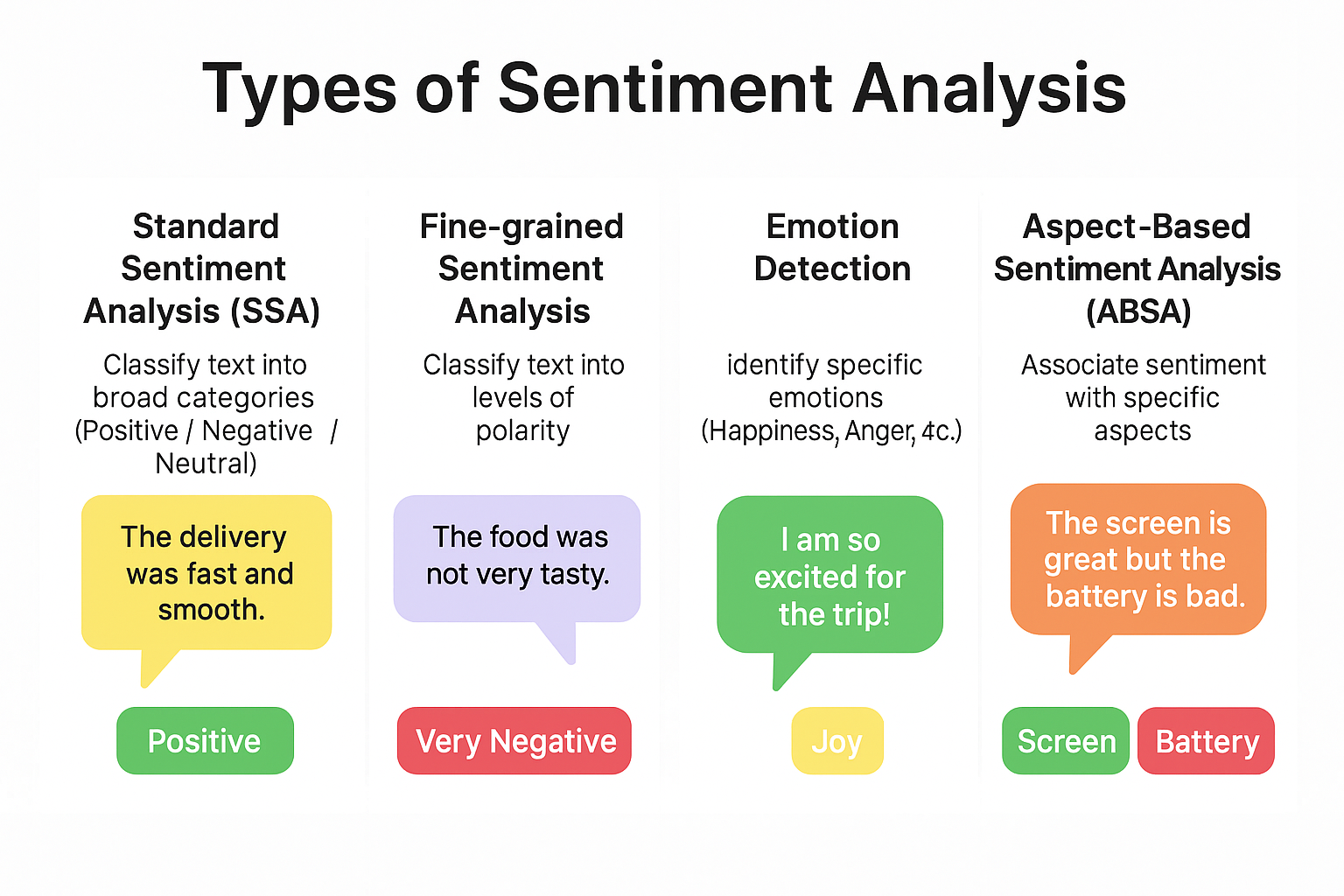
1. Standard Sentiment Analysis
Task: Classify text into broad categories → Positive, Negative, or Neutral.

Example
- Text: “The food was delicious.” → Positive
- Text: “The service was slow.” → Negative
2. Fine-Grained Sentiment Analysis
Task: Break down sentiment into levels of polarity
Very Positive: 😍 / 🤩 / 🥳 / ⭐⭐⭐⭐⭐
Positive: 🙂 / 😊 / ⭐⭐⭐⭐
Neutral: 😐 / 😶 / ⭐⭐⭐
Negative: 🙁 / 😟 / ⭐⭐
Very Negative: 😡 / 😠 / 😭 / ⭐
Sentence
- Text: “The movie was absolutely amazing!” → Very Positive
- Text: “The product is okay.” → Neutral
- Text: “This was the worst experience ever!” → Very Negative
3. Emotion Detection (identifies specific emotions)
Task: Use NLP and psychology-based models to classify emotions.
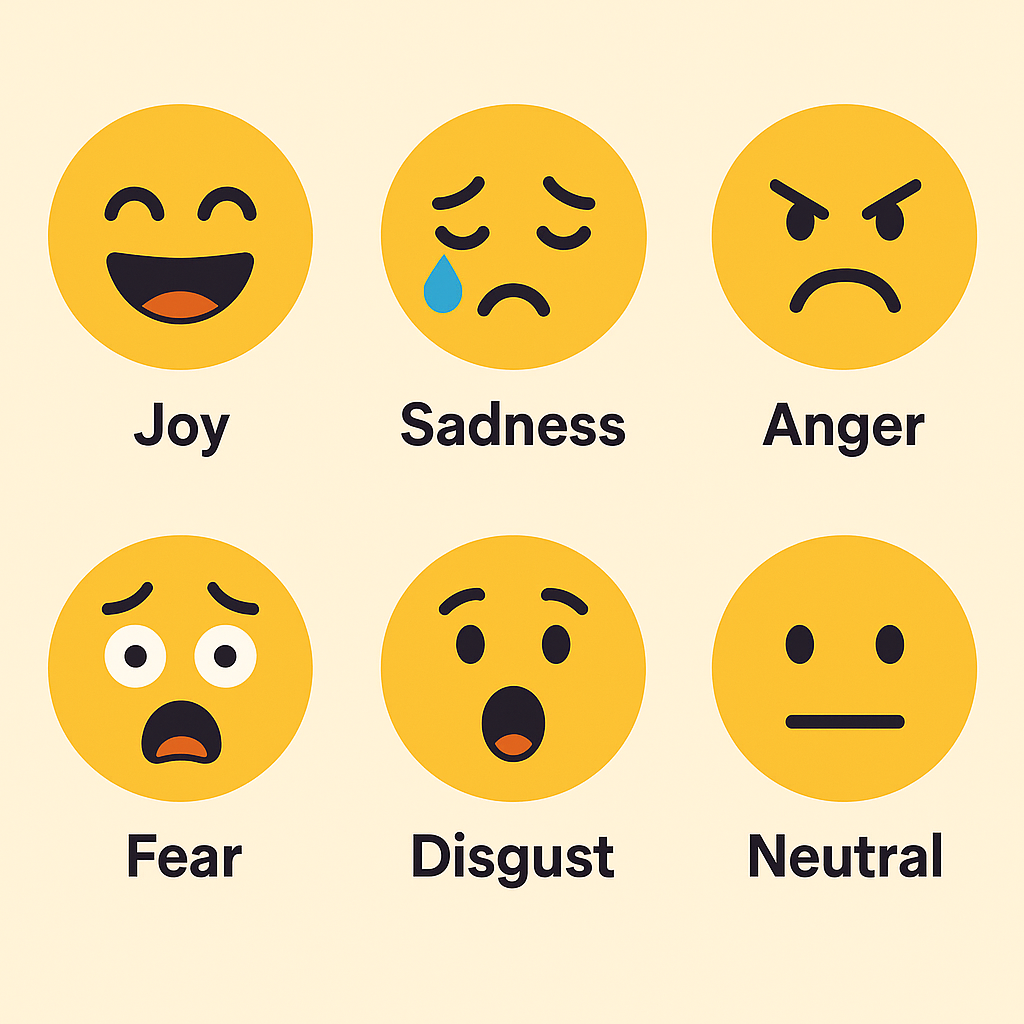
- Happiness
- Anger
- Sadness
- Fear
- Surprise
- Disgust
- etc.
I’m so excited for my new job! → Joy/Excitement 😀🤩
I’m scared about the results. → Fear 😨
This food tastes terrible. → Disgust 🤢
Wow, I didn’t expect that surprise party! → Surprise 😲
4. Aspect-Based Sentiment Analysis (ABSA)
Looks at specific aspects/features of a product or service.
Task: Identify what part of the product/service the sentiment refers to.
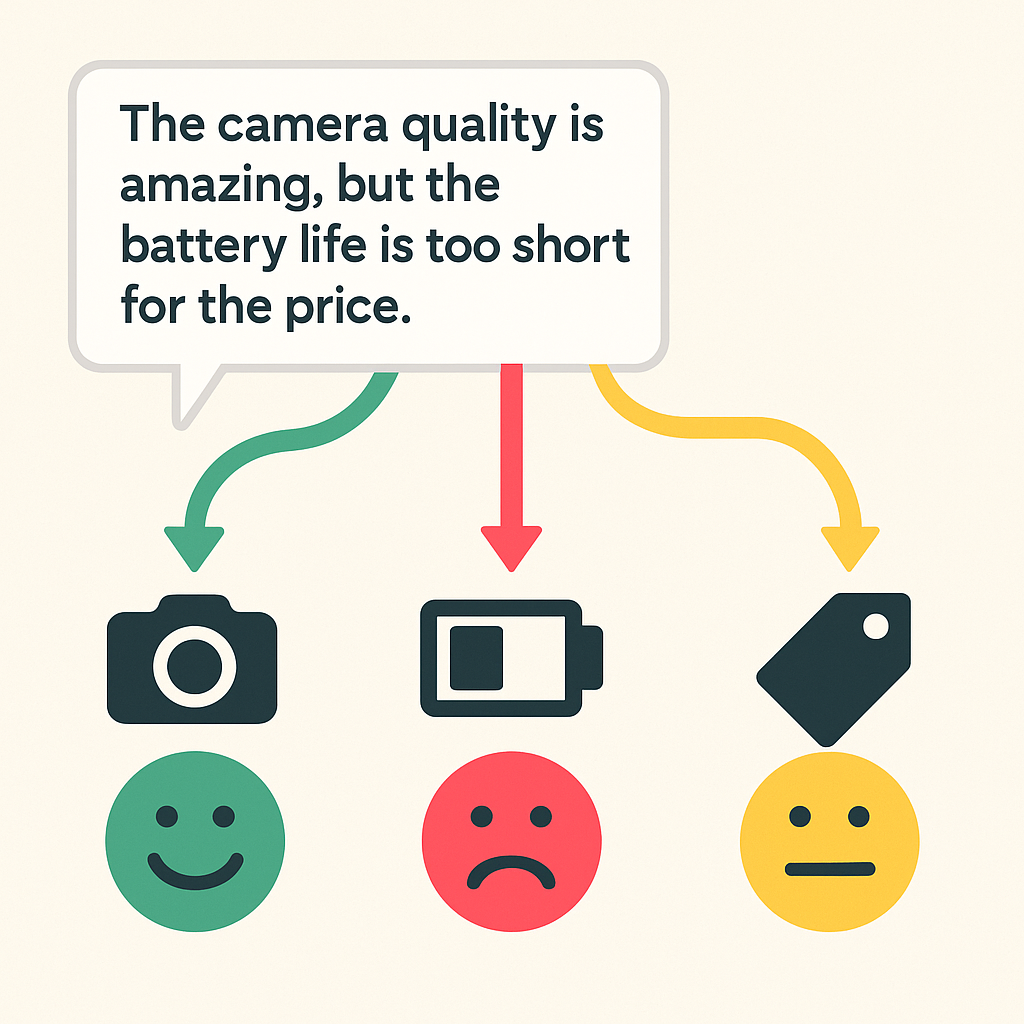
Aspect Sentiments:
Camera → Positive
Battery → Negative
Price → Neutral
Four Sentiment Analysis Types — Mock Exam Summary
| Type | What it identifies | Typical Output |
|---|---|---|
| Standard Sentiment Analysis | Overall polarity | Positive / Negative / Neutral |
| Fine-Grained Sentiment Analysis | Strength or level of sentiment | Very good / Good / Okay / Bad / Very bad |
| Emotion Detection | Specific emotion | Joy / Anger / Sadness / Fear / etc. |
| Aspect-Based Sentiment Analysis (ABSA) | Sentiment toward a specific aspect | Camera = Positive, Battery = Negative |
Quick Recognition
- Five levels of opinion → Fine-Grained Sentiment Analysis
- Positive / Negative / Neutral → Standard Sentiment Analysis
- Joy / Anger / Sadness → Emotion Detection
- Opinion about product features or service aspects → ABSA
Interactive Sentiment Analysis (Demo)
Teaching Demo
This interactive uses a simplified lexicon-based approach to demonstrate how sentiment scores can be constructed from positive/negative words, negation, intensifiers, and emoji cues. It is not a production NLP model. Thai word segmentation is intentionally simplified for classroom demonstration.
(async () => {
// ========== SHELL ==========
const box = html`<div style="max-width:1200px;font:14px system-ui;">
<style>
.grid { display:grid; grid-template-columns: 340px 1fr; gap:16px; }
.card { background:#fff; border:1px solid #ddd; border-radius:10px; padding:12px; }
.row { display:flex; gap:10px; align-items:center; flex-wrap:wrap; }
.pill { display:inline-block; padding:2px 8px; border-radius:999px; font:12px system-ui; border:1px solid #ddd; }
.tok { padding:1px 4px; border-radius:6px; margin:2px 3px; display:inline-block; }
.tok.pos { background:#e7f6ec; border:1px solid #b8e0c6; }
.tok.neg { background:#fde7e7; border:1px solid #f6bcbc; }
.tok.neu { background:#f1f1f1; border:1px solid #e2e2e2; }
.bar { height:12px; background:#eee; border-radius:999px; overflow:hidden; }
.bar > div { height:100%; }
.mono { font-family: ui-monospace, SFMono-Regular, Menlo, Consolas, monospace; }
textarea { width:100%; min-height:120px; font:13px/1.4 system-ui; }
.hint { font-size:12px; color:#666; }
table.dict { width:100%; border-collapse:collapse; }
table.dict th, table.dict td { border-bottom:1px solid #eee; padding:6px 4px; text-align:left; }
table.dict th { border-bottom:1px solid #ddd; }
.badge { font:11px system-ui; border:1px solid #ddd; padding:1px 6px; border-radius:999px; }
</style>
<div class="grid">
<div class="card">
<div class="row"><span class="pill">Sentiment Lab</span></div>
<div style="margin-top:10px">
<label>Language</label>
<div class="row" id="langRow"></div>
<label style="display:block;margin-top:8px">Mode</label>
<div class="row" id="modeRow"></div>
<div id="singleWrap" style="margin-top:8px"></div>
<div id="batchWrap" style="display:none; margin-top:8px"></div>
<div style="margin-top:10px">
<b>Parameters</b>
<div class="row" id="paramRow"></div>
<div style="margin-top:6px" id="threshRow"></div>
</div>
<div style="margin-top:8px" id="btnRow"></div>
<div class="hint" style="margin-top:6px">Tip: Batch mode → one sentence per line; threshold controls what’s considered Neutral.</div>
</div>
</div>
<div class="card">
<div class="row"><span class="pill">Results</span></div>
<div id="summary" style="margin-top:8px"></div>
<div id="viz" style="margin-top:10px"></div>
</div>
</div>
<div class="card" style="margin-top:16px">
<div class="row" style="justify-content:space-between; align-items:center;">
<span class="pill">Detectable Terms Dictionary</span>
<div id="dictCtrl" class="row"></div>
</div>
<div id="dictTable" style="margin-top:8px"></div>
</div>
</div>`;
// ---------- Controls ----------
const langSel = Inputs.radio(["English","Thai"], {value:"English"});
const modeSel = Inputs.radio(["Single text","Batch (one per line)"], {value:"Single text"});
const textSingle= Inputs.textarea({label:"Text", value:"I absolutely love this! But the battery isn't great.", rows:6});
const textBatch = Inputs.textarea({label:"Lines", value:"I love this so much!\nThis is not good at all.\nใช้งานง่ายมากเลย ชอบ!\nไม่ค่อยดีเท่าไหร่", rows:8});
const negToggle = Inputs.toggle({label:"Negation (not/ไม่)", value:true});
const intToggle = Inputs.toggle({label:"Intensifiers (!!, very, มาก)", value:true});
const emojiToggle = Inputs.toggle({label:"Emoji cues 🙂😢", value:true});
const threshRange = Inputs.range([0, 1], {label:"Neutral zone ±", step:0.05, value:0.15});
const analyzeBtn = Inputs.button("Analyze");
box.querySelector("#langRow").append(langSel);
box.querySelector("#modeRow").append(modeSel);
box.querySelector("#singleWrap").append(textSingle);
box.querySelector("#batchWrap").append(textBatch);
box.querySelector("#paramRow").append(negToggle, intToggle, emojiToggle);
box.querySelector("#threshRow").append(threshRange);
box.querySelector("#btnRow").append(analyzeBtn);
function syncMode() {
const singleWrap = box.querySelector("#singleWrap");
const batchWrap = box.querySelector("#batchWrap");
const mode = modeSel.value;
singleWrap.style.display = (mode==="Single text") ? "" : "none";
batchWrap.style.display = (mode==="Batch (one per line)") ? "" : "none";
}
modeSel.addEventListener("input", syncMode);
syncMode();
const summary = box.querySelector("#summary");
const viz = box.querySelector("#viz");
// ========== LEXICONS (Expanded) ==========
const LEX_EN = {
pos: [
"love","great","good","amazing","awesome","nice","happy","excellent","like","fantastic","cool",
"wonderful","brilliant","delightful","impressive","superb","satisfying","pleasant","lovely","marvelous"
],
neg: [
"bad","terrible","awful","hate","worse","worst","boring","slow","buggy","disappoint","disappointed","disappointing","poor",
"horrible","mediocre","useless","unreliable","frustrating","laggy","expensive","crash","broken"
]
};
const LEX_TH = {
pos: [
"ชอบ","ดีมาก","ดี","เยี่ยม","สุดยอด","ประทับใจ","โอเค","ง่าย","เจ๋ง","สุดยอดมาก","รัก",
"ประเสริฐ","โอเคมาก","แจ่ม","ปัง","เริ่ด","คุ้มค่า","ประหยัดเวลา","น่าพอใจ","สวยงาม"
],
neg: [
"แย่","ไม่ดี","แย่มาก","ช้า","ห่วย","ผิดหวัง","น่าเบื่อ","งง","เลว","โคตรแย่","พัง",
"หงุดหงิด","ปวดหัว","ห่วยแตก","แพง","ใช้งานไม่ได้","บั๊ก","หลุด","ค้าง","ล้มเหลว"
]
};
// Emoji cues
const EMOJI = {
"😀":2, "🙂":1.5, "😍":2.5, "😂":1.5, "😢":-2, "😡":-2.5, "😭":-2.5, "👍":1.5, "👎":-1.5,
"🔥":1.5, "💔":-1.5, "✨":1.2, "🤩":2.0, "🤮":-2.0
};
// Intensifiers / Negations
const BOOST_EN = new Set(["very","really","so","extremely","super","highly","truly","incredibly","insanely"]);
const BOOST_TH = new Set(["มาก","มากๆ","สุดๆ","โคตร","สุดสุด","อย่างยิ่ง","สุดยอด"]);
const NEG_EN = new Set(["not","no","never","n't"]);
const NEG_TH = new Set(["ไม่","ไม่ได้","ไม่มี","มิได้","มิใช่","ไม่มีทาง"]);
// ========== Core helpers ==========
const SCORE = (w, lang) => {
const L = (lang==="Thai") ? LEX_TH : LEX_EN;
if (L.pos.includes(w)) return +3;
if (L.neg.includes(w)) return -3;
return 0;
};
function tokenize(text, lang){
if (lang==="Thai"){
const raw = text.replace(/[.,!?()";:]/g, " ").split(/\s+/).filter(Boolean);
return raw;
}
return text.toLowerCase()
.replace(/\b([a-z]+)n['’]t\b/g, "$1 not")
.replace(/[^a-z0-9\s'!🙂😀😍😂😢😡😭👍👎🔥💔✨🤩🤮]/g," ")
.split(/\s+/).filter(Boolean);
}
function analyzeOne(text, lang, opts){
const negSet = (lang==="Thai") ? NEG_TH : NEG_EN;
const boostSet = (lang==="Thai") ? BOOST_TH : BOOST_EN;
const emojis = Array.from(text).filter(c=> EMOJI[c]);
const toks = tokenize(text, lang);
const rows = [];
// simple negation scope (next 1–2 tokens)
let i=0;
while(i<toks.length){
const t = toks[i];
const isNeg = opts.neg && negSet.has(t.replace(/[’']/g,"'"));
if (isNeg){
const nextN = Math.min(2, toks.length - i - 1);
for (let k=1; k<=nextN; k++){
const w = toks[i+k]; const s = SCORE(w, lang);
rows.push({tok:w, base:s, contrib: s ? -s : 0, effect:"negation"});
}
rows.push({tok:t, base:0, contrib:0, effect:"negator"});
i += (1 + nextN);
continue;
}
// base + intensifier (look-behind)
let s = SCORE(t, lang);
const prev = toks[i-1];
if (opts.intens && prev && boostSet.has(prev)){
s = s ? s*1.5 : 0;
}
rows.push({tok:t, base:s, contrib:s, effect: s? "base":"none"});
i++;
}
// emoji contribution
if (opts.emoji && emojis.length){
const emoSum = emojis.reduce((acc,e)=> acc + (EMOJI[e]||0), 0);
rows.push({tok: emojis.join(""), base:emoSum, contrib:emoSum, effect:"emoji"});
}
const raw = rows.reduce((a,b)=> a + (b.contrib||0), 0);
const totalAbs = rows.reduce((a,b)=> a + Math.abs(b.contrib||0), 0);
const normalized = totalAbs > 0 ? raw / totalAbs : 0;
return { rows, raw, normalized };
}
function labelFromScore(s, nz){
if (s > nz) return ["Positive","#26a269"];
if (s < -nz) return ["Negative","#c01c28"];
return ["Neutral","#777"];
}
function renderSingle(text, lang, opts, neutralZone){
const {rows, raw, normalized} = analyzeOne(text, lang, opts);
const [lab, col] = labelFromScore(normalized, neutralZone);
summary.innerHTML = `
<div class="row">
<div class="pill">Language: <b>${lang}</b></div>
<div class="pill">Normalized Score: <b class="mono">${normalized.toFixed(2)}</b></div>
<div class="pill">Label: <b style="color:${col}">${lab}</b></div>
</div>
<div style="margin-top:6px" class="bar">
<div style="width:${Math.max(0, Math.min(100,(normalized+1)/2*100))}%; background:${col}"></div>
</div>
<div class="hint" style="margin-top:6px">Normalized score range: [-1, 1]. Raw lexicon score = ${raw.toFixed(2)}. Neutral if |score| ≤ ${neutralZone}.</div>
`;
const data = rows.filter(r=>r.tok.trim().length)
.map((r,i)=>({i, tok:r.tok, contrib:r.contrib||0, effect:r.effect, sign: Math.sign(r.contrib||0)}));
viz.innerHTML = "";
const W = 820, H = 280;
const fig1 = Plot.plot({
width: W, height: H, grid: true,
x: {label: "token index"},
y: {label: "contribution", domain: [-4.5,4.5]},
marks: [
Plot.ruleY([0]),
Plot.barY(data, {x:"i", y:"contrib", fill: d => d.sign>0 ? "#42b883" : (d.sign<0 ? "#e76f51" : "#bbb")}),
Plot.text(data, {x:"i", y:d=>d.contrib>0? d.contrib+0.15 : d.contrib-0.15, text:"tok", fontSize:11, textAnchor:"middle"})
]
});
const line = document.createElement("div");
line.style.marginTop = "8px";
for (const r of data){
const cls = r.contrib>0 ? "pos" : (r.contrib<0 ? "neg" : "neu");
const tip = `${r.tok} (${(r.contrib||0).toFixed(2)} ${r.effect})`;
line.insertAdjacentHTML("beforeend", `<span class="tok ${cls}" title="${tip}">${r.tok}</span>`);
}
viz.append(fig1, line);
}
function renderBatch(lines, lang, opts, neutralZone){
const rows = [];
for (const s of lines){
const {raw, normalized} = analyzeOne(s, lang, opts);
const [lab] = labelFromScore(normalized, neutralZone);
rows.push({text:s, score:normalized, raw:raw, label:lab});
}
summary.innerHTML = `
<div class="row">
<div class="pill">Language: <b>${lang}</b></div>
<div class="pill">Samples: <b class="mono">${rows.length}</b></div>
</div>
<div class="hint" style="margin-top:6px">Neutral if |score| ≤ ${neutralZone}. Drag the threshold in the sidebar to see label flips.</div>
`;
viz.innerHTML = "";
const W = 820, H = 260;
const figH = Plot.plot({
width: W, height: H, grid:true,
x: {label:"score"},
y: {label:"count"},
marks: [
Plot.rectY(rows, Plot.binY({y:"count"}, {x:"score", thresholds:16})),
Plot.ruleX([neutralZone, -neutralZone], {stroke:"#999", strokeDasharray:"4,4"}),
Plot.text([`+${neutralZone}`], {x:neutralZone, y:0, dy:-8}),
Plot.text([`-${neutralZone}`], {x:-neutralZone, y:0, dy:-8})
]
});
// table
const tbl = html`<table style="width:100%; border-collapse:collapse; margin-top:8px;">
<thead><tr>
<th style="border-bottom:1px solid #ddd; text-align:left">Text</th>
<th style="border-bottom:1px solid #ddd; text-align:right">Score</th>
<th style="border-bottom:1px solid #ddd; text-align:left">Label</th>
</tr></thead>
<tbody></tbody>
</table>`;
const tb = tbl.querySelector("tbody");
for (const r of rows){
const [_, col] = labelFromScore(r.score, neutralZone);
tb.insertAdjacentHTML("beforeend",
`<tr>
<td style="border-bottom:1px solid #eee; padding:4px 0">${r.text.replace(/</g,"<")}</td>
<td class="mono" style="border-bottom:1px solid #eee; text-align:right">${r.score.toFixed(2)}</td>
<td style="border-bottom:1px solid #eee; color:${col}">${r.label}</td>
</tr>`);
}
viz.append(figH, tbl);
}
function run(){
const lang = langSel.value;
const mode = modeSel.value;
const opts = {
neg: !!negToggle.value,
intens: !!intToggle.value,
emoji: !!emojiToggle.value
};
const nz = +threshRange.value;
if (mode === "Single text"){
renderSingle(textSingle.value || "", lang, opts, nz);
} else {
const lines = (textBatch.value || "").split(/\r?\n/).map(s=>s.trim()).filter(Boolean);
renderBatch(lines, lang, opts, nz);
}
}
analyzeBtn.addEventListener("click", run);
run(); // initial
// ======== Dictionary Table (Show/Hide + CSV export) ========
const dictTable = box.querySelector("#dictTable");
const dictCtrl = box.querySelector("#dictCtrl");
const showTblToggle = Inputs.toggle({ label: "Show table", value: false });
const langFilter = Inputs.radio(["All","English","Thai"], {value:"All"});
const typeFilter = Inputs.select(["All","positive","negative","intensifier","negation","emoji"], {value:"All"});
const copyBtn = Inputs.button("Copy CSV");
const downloadBtn= Inputs.button("Download CSV");
dictCtrl.append(
showTblToggle,
html`<span class="badge">Filter:</span>`,
langFilter,
typeFilter,
copyBtn,
downloadBtn
);
function buildDictRows(){
const rows = [];
// EN
for (const w of LEX_EN.pos) rows.push({language:"English", type:"positive", term:w, value:3});
for (const w of LEX_EN.neg) rows.push({language:"English", type:"negative", term:w, value:-3});
for (const w of BOOST_EN) rows.push({language:"English", type:"intensifier", term:w, value:"×1.5"});
for (const w of NEG_EN) rows.push({language:"English", type:"negation", term:w, value:"flip"});
for (const [emo,sc] of Object.entries(EMOJI)) rows.push({language:"English", type:"emoji", term:emo, value:sc});
// TH
for (const w of LEX_TH.pos) rows.push({language:"Thai", type:"positive", term:w, value:3});
for (const w of LEX_TH.neg) rows.push({language:"Thai", type:"negative", term:w, value:-3});
for (const w of BOOST_TH) rows.push({language:"Thai", type:"intensifier", term:w, value:"×1.5"});
for (const w of NEG_TH) rows.push({language:"Thai", type:"negation", term:w, value:"flip"});
return rows;
}
function renderDict(){
const lf = langFilter.value;
const tf = typeFilter.value;
const all = buildDictRows().filter(r =>
(lf==="All" || r.language===lf) &&
(tf==="All" || r.type===tf)
);
const tbl = html`<table class="dict">
<thead>
<tr>
<th>Language</th><th>Type</th><th>Term</th><th>Value</th>
</tr>
</thead>
<tbody></tbody>
</table>`;
const tb = tbl.querySelector("tbody");
for (const r of all){
tb.insertAdjacentHTML("beforeend",
`<tr>
<td>${r.language}</td>
<td>${r.type}</td>
<td class="mono">${r.term.replace(/</g,"<")}</td>
<td class="mono">${r.value}</td>
</tr>`);
}
dictTable.innerHTML = "";
dictTable.append(tbl);
}
function toCSV(rows){
const header = ["language","type","term","value"];
const esc = v => `"${String(v).replace(/"/g,'""')}"`;
const lines = [header.map(esc).join(",")].concat(
rows.map(r => [esc(r.language),esc(r.type),esc(r.term),esc(r.value)].join(","))
);
return lines.join("\n");
}
copyBtn.addEventListener("click", async () => {
const lf = langFilter.value;
const tf = typeFilter.value;
const rows = buildDictRows().filter(r =>
(lf==="All" || r.language===lf) &&
(tf==="All" || r.type===tf)
);
const csv = toCSV(rows);
try {
await navigator.clipboard.writeText(csv);
copyBtn.textContent = "Copied!";
setTimeout(()=> copyBtn.textContent = "Copy CSV", 1000);
} catch {
alert(csv); // fallback
}
});
downloadBtn.addEventListener("click", () => {
const lf = langFilter.value;
const tf = typeFilter.value;
const rows = buildDictRows().filter(r =>
(lf==="All" || r.language===lf) &&
(tf==="All" || r.type===tf)
);
const csv = toCSV(rows);
const blob = new Blob([csv], {type:"text/csv;charset=utf-8"});
const url = URL.createObjectURL(blob);
const a = document.createElement("a");
const ts = new Date().toISOString().slice(0,19).replace(/[:T]/g,"-");
a.href = url;
a.download = `sentiment-dictionary-${lf}-${tf}-${ts}.csv`;
document.body.appendChild(a);
a.click();
a.remove();
URL.revokeObjectURL(url);
});
function syncDictVisibility(){
const on = !!showTblToggle.value;
dictTable.style.display = on ? "" : "none";
}
showTblToggle.addEventListener("input", syncDictVisibility);
langFilter.addEventListener("input", renderDict);
typeFilter.addEventListener("input", renderDict);
renderDict();
syncDictVisibility();
return box;
})()Example
I absolutely love this product—super easy to use! 🙂
The app is good, but the battery life is not great.
This update is incredibly fast and really impressive.
It’s not bad, just a bit slow sometimes.
The UX is terrible… I’m so disappointed. 👎
ใช้งานง่ายมาก ชอบฟีเจอร์ใหม่ที่สุด!
ไม่ดีเท่าไหร่ แถมค้างบ่อยๆ จนหงุดหงิด 😡
บริการโอเคนะ แต่ไม่ได้เร็วมาก
ราคาแพงไปนิด แต่คุณภาพก็ดีมากจริงๆ
Nothing special—works as expected.
Sentiment Analysis Workflows
Rule-Based Sentiment Analysis — Mock Exam Focus
Consider the sentence:
The movie was absolutely fantastic.
A simplified rule-based workflow can be read as follows:
\[\begin{aligned} &\text{Sentence} \rightarrow \text{Tokenization} \rightarrow \text{Stopword Removal}\\ &\rightarrow \text{Keyword Identification} \rightarrow \text{Sentiment Classification} \end{aligned} \]
| Step | Example Result | Meaning |
|---|---|---|
| 1. Text tokenization | The, movie, was, absolutely, fantastic, . | Split the sentence into tokens |
| 2. Stopword removal | movie, absolutely, fantastic | Remove common words that add little information |
| 3. Keyword identification | fantastic | Identify the sentiment-bearing word |
| 4. Sentiment classification | Positive | Assign the final sentiment class |
Mock Exam Tip
If a sentence changes from a complete sentence to a list of separate words, that is tokenization.
If common words such as the or was disappear, that is stopword removal.
Machine-Learning-Based Sentiment Analysis
Machine-learning sentiment analysis has two major stages: Training and Prediction.
Training Stage
\[\begin{aligned} &\text{Labeled Text} \rightarrow \text{Feature Extraction} \rightarrow \text{Numerical Features}\\ &\rightarrow \text{Machine-Learning Algorithm} \rightarrow \text{Trained Classifier Model} \end{aligned} \]
- The machine-learning algorithm is the method that learns from labeled examples.
- The classifier model is the trained model produced by the learning process.
Prediction Stage
\[\begin{aligned} &\text{New Text} \rightarrow \text{Feature Extraction} \rightarrow \text{Numerical Features} \rightarrow \\ &\text{Classifier Model} \rightarrow \text{Predicted Tag} \end{aligned}\]
Training vs. Prediction
Training uses labeled examples to build the model.
Prediction uses the trained model to classify new text.
Workflow of Sentiment Analysis
\[\begin{aligned} &\text{Raw Text} \rightarrow \text{Preprocessing} \rightarrow \text{Feature Representation} \rightarrow\\ &\text{Sentiment Model} \rightarrow \text{Sentiment Output} \end{aligned}\]
Example
Review:
“The battery is not good.”
Output:
Negative sentiment
Interpreting Sentiment Scores
A sentiment score is a numerical summary produced by a sentiment-analysis system. The exact scale depends on the tool, so interpretation should focus on direction and relative strength.
- A positive score generally indicates positive sentiment.
- A negative score generally indicates negative sentiment.
- A score near zero is often interpreted as neutral or mixed, depending on the model.
Important for the Mock Exam
Do not judge a model only by the sign of the score. Read the original sentence and ask whether the assigned score is reasonable.
Example:
“I was hesitant to order because it looked poorly designed, but the product ended up surpassing my expectations in every way.”
The final clause is strongly positive. A clearly negative score would therefore be suspicious and should be examined carefully.
Preprocessing: Cleaning, Normalizing, and Structuring
Key Idea: Preprocessing Is Task-Dependent
There is no single preprocessing pipeline that should always be applied. A useful preprocessing step for Bag of Words or TF–IDF may remove information that is important for sentiment analysis.
Tokenization
- Break text into smaller units such as words, subwords, or phrases.
- Example: “The movie was great” → [“The”, “movie”, “was”, “great”]
Lowercasing / Normalization
- Standardize text to reduce unnecessary variation.
- Example: “Great” and “great” may be treated as the same token.
Stop-Word Removal
- Remove very common words when they add little information for the task.
- Use with caution: words such as not can be important for sentiment.
Stemming / Lemmatization
- Reduce related word forms to a common base form.
- Stemming example: “running”, “runs” → “run”
- Lemmatization example: “am/are/is” → “be”
Punctuation, Symbols, and Emoji
- Remove them only when they are not useful for the analysis.
- In sentiment analysis, !!!, ?, and emoji such as 🙂 or 😡 may carry useful information.
Handling Negation
- Preserve expressions such as “not good” because negation can reverse sentiment.
Domain-Specific Normalization
- Handle abbreviations, spelling variants, hashtags, or technical terminology when necessary.
Example: Choose Preprocessing for the Task
| Technique | BoW / TF–IDF | Sentiment Analysis |
|---|---|---|
| Lowercasing | Often useful | Often useful |
| Stop-word removal | Often useful | Use with caution |
| Remove punctuation | Often useful | Use with caution |
| Remove emoji | Sometimes | Usually avoid |
| Handle negation | Useful | Very important |
🔎 Feature Extraction
Feature Extraction is the process of transforming preprocessed text into numerical vectors that machine learning or deep learning models can understand.
From Text to Numbers
Bag of Words → How often does a word appear?
TF–IDF → How important is the word in this document?
Word Embeddings → What does the word mean?
Contextual Embeddings → What does the word mean in this context?
Main Techniques
1. Bag of Words (BoW)
Concept: Represents text by counting how many times each word appears, ignoring grammar and word order.
Pros: Simple, easy to implement.
Cons: Loses word context, results in sparse data.
Example:
- Text: “The movie was great, great acting”
- Features: {the:1, movie:1, was:1, great:2, acting:1}
Document–Term Matrix (DTM)
When we apply BoW or TF–IDF to many documents, the result can be organized as a Document–Term Matrix.
| Document | good | bad | service | food |
|---|---|---|---|---|
| D1 | 2 | 0 | 1 | 0 |
| D2 | 0 | 1 | 1 | 0 |
| D3 | 1 | 0 | 0 | 2 |
Rows = documents, columns = terms, and cells = counts or TF–IDF weights.
This converts text into the same kind of numerical table used by many machine-learning algorithms.
2. TF–IDF
Beyond the core mock-exam scope: useful for deeper understanding of text representation.
TF–IDF = Term Frequency–Inverse Document Frequency
- TF (Term Frequency): Measures how often a term appears in a document.
- IDF (Inverse Document Frequency): Gives more weight to terms that appear in fewer documents.
High TF–IDF = frequent in this document, but relatively rare across other documents.
- Pros: Highlights terms that help distinguish one document from others.
- Cons: Does not capture word meaning or semantic context.
Example:
- D1: battery battery excellent
- D2: screen excellent
- D3: camera excellent
The word excellent appears in every document → lower IDF.
The word battery appears only in D1 → higher TF–IDF weight in D1.
3. Word Embeddings
Beyond the core mock-exam scope: useful for deeper understanding of semantic representation.
Concept: Represents each word as a dense numerical vector, where words with similar meanings or usage tend to have similar vectors.
Models: Word2Vec, GloVe, fastText.
Pros: Captures semantic relationships between words.
Cons: Traditional word embeddings assign one fixed vector to each word, regardless of context.
Example:
- king – man + woman ≈ queen
4. Contextual Embeddings
Beyond the core mock-exam scope: useful for deeper understanding of modern NLP.
Concept: Represents a word using a vector that changes according to the surrounding context.
Models: BERT, RoBERTa, and other transformer-based language models.
Pros: Captures context-dependent meanings and handles ambiguous words better than traditional word embeddings.
Cons: Requires more computational resources.
Example:
- “bank” in “river bank”
≠
“bank” in “financial bank”
The word bank receives different representations because its meaning changes with context.
From Text to Machine Learning Models
A typical text-mining workflow is:
\[\begin{aligned} &\text{Raw Text} \rightarrow \text{Preprocessing} \rightarrow \text{Numerical Representation} \rightarrow\\ &\text{Machine Learning Model} \rightarrow \text{Output} \end{aligned}\]
Key Idea
Machine learning models generally work with numerical features, not raw text.
Examples of numerical text representations:
- Bag of Words (BoW)
- TF–IDF
- Word Embeddings
- Contextual Embeddings
Regression
- Input to the model: Numerical text features.
- ⚙ Models: Linear Regression, Ridge/Lasso, SVR, Neural Networks.
- Output: Continuous values, e.g., Predicted Rating = 4.2 or Expected Engagement Score = 2,000.
Clustering
- Input to the model: Numerical text features.
- ⚙ Models: k-Means, Hierarchical Clustering, DBSCAN.
- Output: Groups of similar documents, e.g., Delivery Issues, Price Concerns, Product Quality.
Topic Modeling
Topic modeling is also an unsupervised text-mining approach, but it is not the same as clustering. It aims to discover latent themes or topics in a collection of documents.
- Example method: Latent Dirichlet Allocation (LDA)
- Example topics: delivery & shipping, price & value, product quality
Output & Visualization
After preprocessing, feature extraction, and modeling, a text-mining system produces results that can be interpreted and visualized.
Key Outputs
Sentiment Label
- The main classification result.
- Categories: Positive, Negative, Neutral (or Very Positive → Very Negative in fine-grained analysis).
- Example: “The product is excellent” → Positive
Sentiment Score
- A numeric value representing sentiment direction or intensity.
- Some systems normalize the score to –1 to +1, but the scale depends on the tool or model.
- Example: “I love this phone” → +0.85
Class Probability / Confidence
- A probability is always between 0 and 1 (or 0% and 100%).
- Example: \(P(\text{Positive})=0.92\)
Aspect-Based Sentiment
Sentiment toward specific product features.
Example:
“The phone’s camera is great but the battery is bad”
- Camera → Positive (+0.8)
- Battery → Negative (–0.7)
Reading a Word Cloud — Mock Exam Focus
In a typical word cloud, larger words appear more frequently in the source text. Therefore, ranking words by frequency can usually be done by comparing their displayed sizes.
Example
If Dog is the largest word, followed by Baby, Pet, Cat, and Whiskers, the frequency ranking is:
- Dog
- Baby
- Pet
- Cat
- Whiskers
Visualization Techniques
Pie Charts: Show the proportion of Positive / Neutral / Negative reviews.
Bar Charts: Compare sentiment across products, brands, or time periods.
Time-Series Plots: Track sentiment trends over time.
Word Clouds: Highlight frequently occurring words or phrases for exploratory analysis.
Dashboards: Combine charts and KPIs to support decision-making.
Interpreting Word Clouds
Word clouds are useful for exploratory visualization, but word size usually represents frequency, not statistical importance or significance.
Use KWIC (Key Word in Context) to examine how important words are actually used.
Bag of Words — Mock Exam Focus
Bag of Words: Vocabulary
A Bag of Words (BoW) representation uses a vocabulary of distinct tokens and records how often each token occurs. Word order is ignored.
Consider:
birds often fly around trees
a plane flies around the world
If the question states that singular/plural forms and different verb forms are treated as different words, then:
treeandtreesare differentflyandfliesare different
The vocabulary is:
Exam Tip
Do not stem or lemmatize words unless the question explicitly tells you to do so.
Bag of Words: Count Vector
Suppose the vocabulary order is:
For the sentence:
trucks race through streets enjoys a vehicle race cars
count each vocabulary term in exactly that order:
| cars | love | to | race | through | streets | truck | trucks | enjoys | a | vehicle |
|---|---|---|---|---|---|---|---|---|---|---|
| 1 | 0 | 0 | 2 | 1 | 1 | 0 | 1 | 1 | 1 | 1 |
The word race appears twice, so its value is 2.
Bag of Words: Same Vector, Different Word Order
A key property of BoW is that word order is ignored. Two sentences can therefore have the same BoW vector even when their word order is different, as long as they contain the same vocabulary words with the same counts.
How to Answer a Vector Question
- Use the vocabulary order exactly as given.
- Count each word.
- Ignore word order in the sentence.
- Ignore words that are not in the given vocabulary.
- Do not merge singular/plural or verb forms unless instructed.
Interactive Bag of Words
(async () => {
  // ---- Load Plot (with fallback) ----
  let Plot;
  try {
    Plot = await require("@observablehq/plot@0.6.17");
  } catch (err) {
    const m = await import("https://esm.sh/@observablehq/plot@0.6?bundle");
    Plot = m.default || m;
  }

  // ---- Shell & Styles ----
  const box = html`<div style="max-width:1400px;margin:0 auto;font:14px system-ui;">
    <style>
      :root { --bow-border:#111; --bow-muted:#6b7280; }
      .layout { display:grid; grid-template-columns: 380px 1fr; gap:18px; align-items:start; }
      .card { background:#fff; border:1px solid #e5e7eb; border-radius:12px; padding:12px; }
      .row { display:flex; gap:10px; align-items:center; flex-wrap:wrap; }
      .label { font-weight:700; font-size:16px; margin-top:4px; }
      .hint { color:var(--bow-muted); font-size:12px; }
      .textarea { width:100%; min-height:220px; padding:10px 12px; border:3px solid var(--bow-border); border-radius:6px; box-sizing:border-box; font:14px/1.5 system-ui; }
      .field input[type=text] { width:100%; padding:8px 10px; border:3px solid var(--bow-border); border-radius:6px; box-sizing:border-box; }
      .h-radio { display:flex; gap:14px; align-items:center; flex-wrap:wrap; }
      .pill { display:inline-block; padding:2px 8px; border-radius:999px; border:1px solid #ddd; font-size:12px; }
      .topk { display:flex; gap:10px; align-items:center; }
      .topk input[type=number]{ width:88px; padding:6px 8px; border:3px solid var(--bow-border); border-radius:6px; font:14px system-ui; }
      .topk input[type=range]{ width:55%; min-width:260px; }
      #plotWrap { min-height:220px; }
      table.tbl { width:100%; border-collapse:collapse; }
      table.tbl th, table.tbl td { border-bottom:1px solid #eee; padding:6px 8px; text-align:left; }
      table.tbl th { border-bottom:1px solid #ddd; }
      .mono { font-family: ui-monospace, SFMono-Regular, Menlo, Consolas, monospace; }
      details.stopbox > summary { cursor:pointer; user-select:none; font-weight:600; }
      textarea.small { width:100%; min-height:72px; font:12px/1.45 system-ui; }
      .toolbar { display:flex; gap:8px; align-items:center; flex-wrap:wrap; }
      .btn { border:1px solid #d1d5db; background:#f9fafb; border-radius:8px; padding:6px 10px; cursor:pointer; }
      .btn:active { transform: translateY(1px); }
      .muted { color:#6b7280; }
      .empty { color:#666; font-size:13px; }
      @media (max-width: 980px){ .layout{ grid-template-columns: 1fr; } .topk input[type=range]{ width:100%; } }
    </style>

    <div class="layout">
      <!-- Left: Controls -->
      <div class="card" id="controls">
        <div class="row"><span class="pill">Bag-of-Words Lab</span></div>

        <div class="label">Input text</div>
        <textarea id="txt" class="textarea" spellcheck="false"
          placeholder="Type/paste English text here..."></textarea>

        <div class="label" style="margin-top:10px;">Normalization</div>
        <div id="normRow" class="h-radio"></div>

        <div class="label" style="margin-top:10px;">Filter out</div>
        <div class="hint">Enter words separated by spaces (e.g., the a an of to and ...)</div>
        <div class="field"><input id="stopInp" type="text" placeholder="the a an of to and ..." /></div>

        <details class="stopbox" style="margin-top:10px;">
          <summary>Stopwords Menu <span class="hint">(quick presets & custom)</span></summary>
          <div class="row" style="margin-top:8px; align-items:flex-start;">
            <div style="flex:1;">
              <div class="hint">Preset EN stopwords</div>
              <textarea id="presetEN" class="small"></textarea>
            </div>
            <div style="flex:1;">
              <div class="hint">Custom stopwords (space/comma/newline)</div>
              <textarea id="customSW" class="small" placeholder="add your own..."></textarea>
            </div>
          </div>
          <div class="toolbar" style="margin-top:6px;">
            <button id="applySW" class="btn">Apply stopwords</button>
            <span id="swInfo" class="muted"></span>
          </div>
        </details>

        <div class="label" style="margin-top:10px;">Top-K</div>
        <div class="topk">
          <input id="kNum" type="number" value="15" min="1" max="200" step="1" />
          <input id="kRng" type="range" value="15" min="1" max="200" step="1" />
          <span class="muted">words</span>
        </div>

        <div class="toolbar" style="margin-top:10px;">
          <button id="rebuild" class="btn">Rebuild</button>
          <button id="reset" class="btn">Reset sample</button>
          <span id="status" class="muted"></span>
        </div>
      </div>

      <!-- Right: Results -->
      <div class="card">
        <div class="row"><span class="pill">Results</span></div>
        <div id="plotWrap" style="margin-top:6px;"></div>

        <div class="toolbar" style="margin-top:10px;">
          <label class="h-radio" style="gap:8px;">
            <input id="showTbl" type="checkbox" checked />
            <span>Show table</span>
          </label>
          <button id="copyCSV" class="btn">Copy CSV</button>
          <button id="dlCSV" class="btn">Download CSV</button>
          <span id="meta" class="muted"></span>
        </div>
        <div id="tableWrap" style="margin-top:8px;"></div>
      </div>
    </div>
  </div>`;

  // ---- Controls refs ----
  const txt = box.querySelector("#txt");
  const normRow = box.querySelector("#normRow");
  const stopInp = box.querySelector("#stopInp");
  const presetEN = box.querySelector("#presetEN");
  const customSW = box.querySelector("#customSW");
  const applySW = box.querySelector("#applySW");
  const swInfo   = box.querySelector("#swInfo");
  const kNum = box.querySelector("#kNum");
  const kRng = box.querySelector("#kRng");
  const rebuildBtn = box.querySelector("#rebuild");
  const resetBtn   = box.querySelector("#reset");
  const status     = box.querySelector("#status");
  const plotWrap = box.querySelector("#plotWrap");
  const showTbl = box.querySelector("#showTbl");
  const copyCSV = box.querySelector("#copyCSV");
  const dlCSV   = box.querySelector("#dlCSV");
  const meta    = box.querySelector("#meta");
  const tableWrap = box.querySelector("#tableWrap");

  // ---- Normalization radios ----
  function radio(name, items, value){
    const wrap = document.createElement("div");
    wrap.className = "h-radio";
    items.forEach(v => {
      const id = `${name}-${v}`;
      const lab = html`<label for="${id}" style="display:inline-flex;gap:6px;align-items:center;">
        <input type="radio" name="${name}" id="${id}" value="${v}" ${v===value?'checked':''}/>
        <span>${v}</span>
      </label>`;
      wrap.append(lab);
    });
    return wrap;
  }
  const normWidget = radio("norm", ["none","stem","lemma"], "none");
  normRow.append(normWidget);

  function normValue(){
    const el = normWidget.querySelector("input:checked");
    return el ? el.value : "none";
  }

  // ---- Preset EN stopwords ----
  const PRESET_EN = "a an the and or of to in on for with at from by is am are was were be been being it its as that this these those not very really so too just have has had do does did can could should would will about into over than then out up down more most less least again only also if when while which who whom what why how all any each other some no yes ever even".split(/\s+/);
  presetEN.value = PRESET_EN.join(" ");

  // ---- State ----
  let STOP = new Set();
  let rowsAll = [];   // [{word,count}]
  let rowsTop = [];   // top-K applied

  // ---- Sample text & reset ----
  const sample = [
    "I absolutely love this product. It’s incredibly easy to use and the design is delightful!",
    "But the battery is not great, and the app sometimes feels slow.",
    "Great value for money and super easy to use; onboarding is confusing in parts.",
    "Customer support was helpful and incredibly quick to respond."
  ].join("\n");
  function resetSample(){ txt.value = sample; }
  resetSample();

  // ---- Utils ----
  function tokenize(s){
    return (s||"").toLowerCase().match(/[a-z]+/g) ?? [];
  }
  function stem(w){
    let s = (w||"").toLowerCase().replace(/['’]s?$/, "");
    if (!s) return s;
    const rep = [
      [/sses$/, "ss"], [/ies$/, "y"], [/s$/, ""],
      [/ingly$/, ""], [/edly$/, ""], [/ing$/, ""], [/ed$/, ""],
      [/ational$/, "ate"], [/tional$/, "tion"], [/izer$/, "ize"],
      [/isation$/, "ize"], [/fulness$/, "ful"], [/ousness$/, "ous"],
      [/iveness$/, "ive"], [/ment$/, ""], [/ness$/, ""], [/able$/, ""],
      [/ible$/, ""], [/al$/, ""], [/er$/, ""], [/est$/, ""], [/ly$/, ""]
    ];
    for (const [re, r] of rep) s = s.replace(re, r);
    s = s.replace(/([b-df-hj-np-tv-z])\1$/, "$1");
    s = s.replace(/(xes|ches|shes|sses|zes)$/, () => s.slice(0, -2));
    return s;
  }
  const lemma = (() => {
    const irr = new Map(Object.entries({
      am:"be", is:"be", are:"be", was:"be", were:"be", been:"be",
      has:"have", had:"have", does:"do", did:"do", done:"do",
      went:"go", gone:"go", ran:"run", running:"run",
      ate:"eat", eaten:"eat", saw:"see", seen:"see",
      bought:"buy", brought:"bring", thought:"think",
      better:"good", best:"good", worse:"bad", worst:"bad",
      children:"child", men:"man", women:"woman",
      mice:"mouse", geese:"goose", feet:"foot", teeth:"tooth", people:"person"
    }));
    return function (w){
      if (!w) return "";
      let s = String(w).toLowerCase().replace(/['’]s?$/, "");
      if (irr.has(s)) return irr.get(s);
      if (/(^.{3,})ies$/.test(s)) return s.slice(0, -3) + "y";
      if (/(xes|ches|shes|sses|zes)$/.test(s)) return s.slice(0, -2);
      if (/s$/.test(s) && !/ss$/.test(s)) s = s.slice(0, -1);
      if (/(^.{3,})ied$/.test(s)) return s.slice(0, -3) + "y";
      if (/([b-df-hj-np-tv-z])\1ed$/.test(s)) return s.slice(0, -3);
      if (/ed$/.test(s) && s.length > 3) s = s.replace(/ed$/, "");
      if (/([b-df-hj-np-tv-z])\1ing$/.test(s)) return s.slice(0, -4);
      if (/ing$/.test(s) && s.length > 4) s = s.slice(0, -3);
      if (/(^.{3,})iest$/.test(s)) return s.slice(0, -4) + "y";
      if (/(^.{3,})ier$/.test(s))  return s.slice(0, -3) + "y";
      if (/est$/.test(s) && s.length > 4) s = s.slice(0, -3);
      if (/er$/.test(s)  && s.length > 4) s = s.slice(0, -2);
      if (/ly$/.test(s)  && s.length > 4) s = s.slice(0, -2);
      return irr.get(s) || s;
    };
  })();

  function buildStopSet(){
    const manual = (stopInp.value || "").toLowerCase().match(/[a-z]+/g) ?? [];
    const preset = (presetEN.value || "").toLowerCase().match(/[a-z]+/g) ?? [];
    const custom = (customSW.value || "").toLowerCase().split(/[\s,]+/).filter(Boolean);
    STOP = new Set([...preset, ...manual, ...custom]);
    swInfo.textContent = `Stopwords loaded: ${STOP.size}`;
  }

  // ---- Core pipeline ----
  function process(){
    const tokens = tokenize(txt.value);
    const kept = tokens.filter(w => !STOP.has(w));
    const norm = normValue();
    const final = norm === "stem" ? kept.map(stem)
               : norm === "lemma" ? kept.map(lemma)
               : kept;

    const m = new Map();
    for (const w of final) m.set(w, (m.get(w)||0) + 1);
    rowsAll = Array.from(m, ([word, count]) => ({word, count}))
                   .sort((a,b)=> b.count - a.count || a.word.localeCompare(b.word));

    const K = +kNum.value || 15;
    rowsTop = rowsAll.slice(0, Math.min(K, rowsAll.length));
  }

  function renderPlot(){
    plotWrap.innerHTML = "";
    if (!rowsTop.length){
      plotWrap.innerHTML = `<div class="empty">No tokens to display. Try removing some stopwords or adding more text.</div>`;
      return;
    }
    const fig = Plot.plot({
      width: plotWrap.clientWidth || 800,
      height: Math.max(220, rowsTop.length * 26),
      marginLeft: 110,
      x: { label: "Count →" },
      y: { domain: rowsTop.map(d=>d.word) },
      marks: [
        Plot.barX(rowsTop, {x:"count", y:"word", fill:"#4f46e5"}),
        Plot.text(rowsTop, {x:"count", y:"word", text: d=>d.count, dx:6, textAnchor:"start", fill:"#111"})
      ]
    });
    plotWrap.append(fig);
  }

  function renderTable(){
    tableWrap.innerHTML = "";
    if (!showTbl.checked) { tableWrap.style.display = "none"; return; }
    tableWrap.style.display = "";

    const tbl = html`<table class="tbl">
      <thead><tr><th>word</th><th style="text-align:right">count</th></tr></thead>
      <tbody></tbody>
    </table>`;
    const tb = tbl.querySelector("tbody");
    for (const r of rowsAll){
      tb.insertAdjacentHTML("beforeend",
        `<tr><td class="mono">${r.word}</td><td class="mono" style="text-align:right">${r.count}</td></tr>`
      );
    }
    tableWrap.append(tbl);
  }

  function syncMeta(){
    meta.textContent = `Vocab: ${rowsAll.length} • Showing top-K: ${rowsTop.length}`;
  }

  function toCSV(rows){
    const esc = v => `"${String(v).replace(/"/g,'""')}"`;
    return ["word,count"].concat(rows.map(r=>`${esc(r.word)},${r.count}`)).join("\n");
  }

  function rebuild(){
    buildStopSet();
    process();
    renderPlot();
    renderTable();
    syncMeta();
    status.textContent = "Updated";
    setTimeout(()=> status.textContent = "", 800);
  }

  // ---- Wire up ----
  // sync K number/range
  function syncKFromNum(){ kRng.value = kNum.value; rebuild(); }
  function syncKFromRng(){ kNum.value = kRng.value; rebuild(); }
  kNum.addEventListener("input", syncKFromNum);
  kRng.addEventListener("input", syncKFromRng);

  // auto rebuild on change (debounced)
  const debounce = (fn, ms=120)=>{ let t; return (...a)=>{ clearTimeout(t); t=setTimeout(()=>fn(...a),ms); }; };
  const schedule = debounce(rebuild, 120);

  txt.addEventListener("input", schedule);
  stopInp.addEventListener("input", schedule);
  normWidget.addEventListener("input", rebuild);
  applySW.addEventListener("click", rebuild);
  showTbl.addEventListener("change", renderTable);
  rebuildBtn.addEventListener("click", rebuild);
  resetBtn.addEventListener("click", () => { resetSample(); rebuild(); });
  window.addEventListener("resize", debounce(()=>{ renderPlot(); }, 80), {passive:true});

  // CSV actions
  copyCSV.addEventListener("click", async () => {
    const csv = toCSV(rowsAll);
    try { await navigator.clipboard.writeText(csv); copyCSV.textContent = "Copied!"; setTimeout(()=>copyCSV.textContent="Copy CSV",800); }
    catch { alert(csv); }
  });
  dlCSV.addEventListener("click", () => {
    const csv = toCSV(rowsAll);
    const blob = new Blob([csv], {type:"text/csv;charset=utf-8"});
    const url = URL.createObjectURL(blob);
    const a = document.createElement("a");
    const ts = new Date().toISOString().slice(0,19).replace(/[:T]/g,"-");
    a.href = url; a.download = `bag_of_words-${ts}.csv`; document.body.appendChild(a); a.click(); a.remove();
    URL.revokeObjectURL(url);
  });

  // ---- First build ----
  rebuild();

  return box;
})()
Interactive Word Cloud (demo)
(async () => {
const box = html`<div style="max-width:1200px;font:14px system-ui;">
<style>
.layout { display:grid; grid-template-columns: 360px 1fr; gap:16px; }
.card { background:#fff; border:1px solid #e5e7eb; border-radius:12px; padding:12px; }
.row { display:flex; gap:10px; align-items:center; flex-wrap:wrap; }
.pill { display:inline-block; padding:2px 8px; border-radius:999px; font:12px system-ui; border:1px solid #ddd; }
#cloudWrap { position:relative; width:100%; min-height:560px; border:1px dashed #ddd; border-radius:12px; overflow:hidden; background:#fafafa; }
.token { position:absolute; cursor:pointer; user-select:none; white-space:nowrap; transition: transform .06s ease-out, opacity .2s; }
.token:hover { outline:1px dashed rgba(0,0,0,.25); outline-offset:2px; }
.kwic { font:13px/1.5 system-ui; }
.kwic b { background: #fff3b0; padding:0 2px; border-radius:3px; }
.hint { color:#666; font-size:12px; }
.empty { position:absolute; inset:0; display:flex; align-items:center; justify-content:center; color:#666; font-size:13px; }
details.stopbox > summary { cursor:pointer; user-select:none; }
textarea.small { width:100%; min-height:80px; font:12px/1.4 system-ui; }
.badge { font:11px system-ui; border:1px solid #ddd; padding:1px 6px; border-radius:999px; }
</style>
<div class="layout">
<div class="card">
<div class="row"><span class="pill">Word Cloud Controls</span></div>
<div style="margin-top:8px">
<label>Language</label>
<div class="row" id="langRow"></div>
<label style="display:block;margin-top:8px">N-gram</label>
<div class="row" id="ngRow"></div>
<div style="margin-top:8px" id="txtRow"></div>
<div style="margin-top:8px">
<b>Options</b>
<div class="row" id="optRow"></div>
<div style="margin-top:6px" id="rngRow"></div>
<div style="margin-top:6px" id="rngRow2"></div>
</div>
<details class="stopbox" style="margin-top:10px">
<summary><b>Stopwords Menu</b> <span class="hint">(จัดการคำฟังก์ชัน/ตัวเชื่อม เช่น is, am, are, the, a ฯลฯ)</span></summary>
<div style="margin-top:8px" id="stopCtrl"></div>
</details>
<div class="row" style="margin-top:10px" id="btnRow"></div>
<div class="hint" style="margin-top:6px">
Tip: ถ้าแน่นเกินไป ลองลด Max words หรือเพิ่ม Min font
</div>
</div>
</div>
<div class="card">
<div class="row"><span class="pill">Interactive Word Cloud</span></div>
<div id="stats" style="margin-top:6px"></div>
<div id="cloudWrap" style="margin-top:8px"></div>
</div>
</div>
<div class="card" style="margin-top:16px">
<div class="row"><span class="pill">KWIC (Key Word In Context)</span></div>
<div id="kwic" class="kwic" style="margin-top:8px"></div>
</div>
</div>`;
// -------- Controls --------
const langSel = Inputs.radio(["English","Thai"], {value:"English"});
const ngSel = Inputs.radio(["unigram","bigram","trigram"], {value:"unigram"});
const sampleTxt = [
"I absolutely love this product. It’s incredibly easy to use and the design is delightful!",
"But the battery is not great, and the app sometimes feels slow.",
"บริการรวดเร็วมาก ทีมงานตอบไว ประทับใจสุด ๆ ใช้งานง่าย",
"แต่ราคาค่อนข้างแพง และบางครั้งก็มีอาการค้าง ไม่ค่อยดีเท่าไหร่"
].join("\n");
const txtArea = Inputs.textarea({label:"Text", value: sampleTxt, rows:12});
const caseFold = Inputs.toggle({label:"Lowercase (EN)", value:true});
const rmStop = Inputs.toggle({label:"Remove stopwords", value:true});
const stripShort= Inputs.toggle({label:"Remove short tokens (≤2 letters)", value:false});
const rotateOpt = Inputs.select(["none","±30°","±60°","random"], {label:"Rotation", value:"±30°"});
const scaleSel = Inputs.select(["sqrt","linear","log"], {label:"Size scale", value:"sqrt"});
const maxWords = Inputs.range([50, 2000], {label:"Max words", value:300, step:50}); // ขยายได้ถึง 2,000
const minFreq = Inputs.range([1, 50], {label:"Min frequency", value:1, step:1});
const minFont = Inputs.range([8, 36], {label:"Min font (px)", value:12, step:1});
const maxFont = Inputs.range([28, 160], {label:"Max font (px)", value:80, step:2});
const runBtn = Inputs.button("Build cloud");
const shuffleBtn = Inputs.button("Shuffle layout");
box.querySelector("#langRow").append(langSel);
box.querySelector("#ngRow").append(ngSel);
box.querySelector("#txtRow").append(txtArea);
box.querySelector("#optRow").append(caseFold, rmStop, stripShort, rotateOpt, scaleSel);
box.querySelector("#rngRow").append(maxWords, minFreq);
box.querySelector("#rngRow2").append(minFont, maxFont);
box.querySelector("#btnRow").append(runBtn, shuffleBtn);
const stats = box.querySelector("#stats");
const cloudWrap = box.querySelector("#cloudWrap");
const kwicBox = box.querySelector("#kwic");
// -------- Stopwords Base & Menu --------
const STOP_EN_BASE = new Set(("a,an,the,and,or,of,to,in,on,for,with,at,from,by,is,am,are,was,were,be,been,being,it,its,as,that,this,these,those,not,very,really,so,too,just,have,has,had,do,does,did,can,could,should,would,will,about,into,over,than,then,out,up,down,more,most,less,least,again,only,also,if,when,while,which,who,whom,what,why,how,all,any,each,other,some,no,yes,ever,even").split(","));
const STOP_TH_BASE = new Set(("และ,หรือ,ของ,ที่,ได้,ใน,บน,ให้,กับ,จาก,ว่า,ก็,ค่ะ,ครับ,นะ,น่ะ,เลย,มาก,สุดๆ,ๆ,ก็ได้,อีก,ยัง,จึง,เพราะ,แต่,เมื่อ,ซึ่ง,คือ,เป็น,ได้ว่า,ได้ไหม,โดย,อยู่,ไป,มา,แล้ว,ด้วย,หรือไม่,ไม่,ไม่ได้").split(","));
const useDefaultEN = Inputs.toggle({label:"Use default EN stopwords", value:true});
const useDefaultTH = Inputs.toggle({label:"Use default TH stopwords", value:true});
const customEN = Inputs.textarea({label:"Custom EN stopwords (comma/space/newline)", rows:4, value:""});
const customTH = Inputs.textarea({label:"Custom TH stopwords (คั่นด้วยเว้นวรรค/จุลภาค/ขึ้นบรรทัดใหม่)", rows:4, value:""});
const applyStop = Inputs.button("Apply stopwords");
const stopCtrl = box.querySelector("#stopCtrl");
stopCtrl.append(
html`<div class="row"><span class="badge">English</span></div>`,
useDefaultEN, customEN,
html`<div class="row" style="margin-top:6px"><span class="badge">Thai</span></div>`,
useDefaultTH, customTH,
html`<div class="row" style="margin-top:8px">${applyStop}</div>`,
html`<div class="hint" id="stopInfo" style="margin-top:6px"></div>`
);
const stopInfo = box.querySelector("#stopInfo");
function parseCustomList(text){
return new Set(text.split(/[\s,]+/).map(s=>s.trim()).filter(Boolean));
}
let STOP_EN = new Set(STOP_EN_BASE);
let STOP_TH = new Set(STOP_TH_BASE);
function rebuildStop(){
const addEN = parseCustomList(customEN.value);
const addTH = parseCustomList(customTH.value);
STOP_EN = new Set(useDefaultEN.value ? [...STOP_EN_BASE, ...addEN] : [...addEN]);
STOP_TH = new Set(useDefaultTH.value ? [...STOP_TH_BASE, ...addTH] : [...addTH]);
stopInfo.innerHTML = `EN stopwords: <b>${STOP_EN.size}</b> • TH stopwords: <b>${STOP_TH.size}</b>`;
}
applyStop.addEventListener("click", () => { rebuildStop(); buildCloud(false); });
rebuildStop();
// -------- Helpers --------
const palette = ["#4E79A7","#F28E2B","#E15759","#76B7B2","#59A14F","#EDC949","#AF7AA1","#FF9DA7","#9C755F","#BAB0AC"];
function extent(arr){
if (!arr.length) return [0,1];
let mn=arr[0], mx=arr[0];
for (const v of arr){ if(v<mn) mn=v; if(v>mx) mx=v; }
return [mn,mx];
}
function makeScale(kind, domain, range){
const [d0,d1] = domain, [r0,r1] = range;
if (d1 === d0) return () => (r0 + r1) / 2;
if (kind === "linear"){
const m = (r1-r0)/(d1-d0); return v => r0 + m*(v - d0);
}
if (kind === "log"){
const a = Math.max(1e-9, d0), b = Math.max(a*1.000001, d1);
const la = Math.log(a), lb = Math.log(b);
const m = (r1-r0)/(lb-la); return v => r0 + m*(Math.log(Math.max(a, v)) - la);
}
// sqrt
const m = 1/Math.sqrt(d1 - d0);
return v => r0 + (r1 - r0) * Math.sqrt(Math.max(0, v - d0)) * m;
}
// -------- Tokenization --------
function tokenize(text, lang){
if (lang === "Thai"){
return text.replace(/[“”"(),.!?:;[\]\-—]/g, " ")
.split(/\s+/).map(t=>t.trim()).filter(Boolean);
}
return text.toLowerCase()
.replace(/[^a-z0-9\s'-]/g, " ")
.split(/\s+/).map(t=>t.trim()).filter(Boolean);
}
function buildNgrams(tokens, n){
if (n===1) return tokens;
const grams = [];
for (let i=0;i<=tokens.length-n;i++){
grams.push(tokens.slice(i,i+n).join(" "));
}
return grams;
}
// -------- Frequency + filtering --------
function freqCount(text, lang, ngram, doLower, removeStop){
let t = text;
if (doLower && lang==="English") t = t.toLowerCase();
let tokens = tokenize(t, lang);
if (stripShort.value && lang==="English"){
tokens = tokens.filter(w => w.length > 2); // ตัดคำสั้นมาก ๆ
}
const n = ngram==="unigram" ? 1 : (ngram==="bigram" ? 2 : 3);
const grams = buildNgrams(tokens, n);
const stop = (lang==="Thai") ? STOP_TH : STOP_EN;
const f = new Map();
for (const g of grams){
if (removeStop && n===1 && stop.has(g)) continue;
if (removeStop && n>1){
const parts = g.split(" ");
if (parts.every(w => stop.has(w))) continue;
}
f.set(g, (f.get(g)||0)+1);
}
return f;
}
// -------- Layout (spiral + collision) --------
function rand(seed=Date.now()){
let s = seed >>> 0;
return function(){
s = Math.imul(1664525, s) + 1013904223 | 0;
return (s>>>0) / 4294967296;
};
}
function placeWords(words, W, H, rotateMode, rng, maxTrials=3500){
const placed = [];
const ctx = document.createElement("canvas").getContext("2d");
function measure(t, fontPx){
ctx.font = `${Math.round(fontPx)}px system-ui, -apple-system, Segoe UI, Roboto`;
const w = ctx.measureText(t).width;
const h = fontPx;
return [w, h];
}
function pickAngle(){
if (rotateMode==="none") return 0;
if (rotateMode==="±30°") return (rng()<0.5 ? -1 : 1) * (Math.PI/6);
if (rotateMode==="±60°") return (rng()<0.5 ? -1 : 1) * (Math.PI/3);
const deg = [-90,-60,-30,0,30,60,90][Math.floor(rng()*7)];
return deg * Math.PI/180;
}
function collide(r, others){
for (const o of others){
if (r.x + r.w < o.x || o.x + o.w < r.x || r.y + r.h < o.y || o.y + o.h < r.y) continue;
return true;
}
return false;
}
const centerX = W/2, centerY = H/2;
for (const w of words){
const angle = pickAngle();
const [w0, h0] = measure(w.text, w.size);
const cos = Math.cos(angle), sin = Math.sin(angle);
const wRot = Math.abs(w0*cos) + Math.abs(h0*sin);
const hRot = Math.abs(w0*sin) + Math.abs(h0*cos);
let success = false;
for (let t=0; t<maxTrials; t++){
const r = 2 + 4 * (t/20);
const th = t * 0.15;
const x = centerX + r * Math.cos(th) - wRot/2;
const y = centerY + r * Math.sin(th) - hRot/2;
const cand = {x, y, w:wRot+2, h:hRot+2};
if (x<0 || y<0 || x+wRot>W || y+hRot>H) continue;
if (!collide(cand, placed.map(p=>p.rect))){
placed.push({rect:cand, text:w.text, size:w.size, angle, color:w.color});
success = true;
break;
}
}
if (!success) {
// ถ้าวางไม่ได้ ให้ข้าม (กันค้างเมื่อคำเยอะมาก)
}
// soft cap เพื่อความเร็ว (รองรับได้หลายร้อยคำ)
if (placed.length > 1200) break;
}
return placed;
}
// -------- KWIC --------
function kwic(text, term, window=30){
const re = new RegExp(term.replace(/[.*+?^${}()|[\]\\]/g, "\\$&"), "gi");
const out = [];
let m;
while ((m = re.exec(text))!==null){
const i = m.index, j = re.lastIndex;
out.push({
pre: text.slice(Math.max(0, i-window), i),
hit: text.slice(i, j),
post: text.slice(j, Math.min(text.length, j+window))
});
if (out.length>=30) break;
}
return out;
}
// -------- Render cloud --------
let seed = Date.now();
function buildCloud(shuffle=false){
if (shuffle) seed = Date.now();
const text = txtArea.value || "";
const lang = langSel.value;
const ngram = ngSel.value;
const f = freqCount(text, lang, ngram, !!caseFold.value, !!rmStop.value);
let rows = Array.from(f.entries()).map(([term, count]) => ({term, count}));
rows = rows.sort((a,b)=> b.count - a.count);
let used = rows.filter(r => r.count >= +minFreq.value).slice(0, +maxWords.value);
let note = "";
if (used.length === 0) {
used = rows.slice(0, Math.min(+maxWords.value, 500));
note = ` (fallback: no tokens ≥ Min frequency; showing top ${used.length})`;
}
const counts = used.map(d=>d.count);
const [c0, c1] = extent(counts.length ? counts : [1,1]);
const scale = makeScale(scaleSel.value, [c0, c1], [+minFont.value, +maxFont.value]);
const words = used.map((r,i)=>({
text: r.term,
size: scale(r.count),
color: palette[i % palette.length]
}));
const W = cloudWrap.clientWidth || 860;
const H = Math.max(560, cloudWrap.clientHeight || 560);
const rng = rand(seed);
const placed = placeWords(words, W, H, rotateOpt.value, rng);
cloudWrap.innerHTML = "";
if (placed.length === 0){
const empty = document.createElement("div");
empty.className = "empty";
empty.innerHTML = `No tokens to display. Try lowering <b>Min frequency</b>, turning off <b>Remove stopwords</b>, or increasing <b>Max words</b>.`;
cloudWrap.append(empty);
} else {
for (const w of placed){
const span = document.createElement("span");
span.className = "token";
span.textContent = w.text;
span.style.left = `${w.rect.x}px`;
span.style.top = `${w.rect.y}px`;
span.style.fontSize = `${Math.round(w.size)}px`;
span.style.color = w.color;
span.style.transform = `rotate(${(w.angle*180/Math.PI).toFixed(1)}deg)`;
span.title = `${w.text}`;
span.addEventListener("click", () => {
for (const el of cloudWrap.querySelectorAll(".token")) el.style.opacity = ".35";
span.style.opacity = "1";
const kw = kwic(text, w.text, 40);
kwicBox.innerHTML = kw.length
? kw.map(k => `${k.pre.replace(/</g,"<")}<b>${k.hit.replace(/</g,"<")}</b>${k.post.replace(/</g,"<")}`).join("<br>")
: `<span class="hint">No occurrences found (tokenizer/stopwords may have filtered it).</span>`;
});
cloudWrap.append(span);
}
}
stats.innerHTML = `Tokens shown: <b>${placed.length}</b>${note} • Vocab: <b>${rows.length}</b> • Min freq ≥ ${+minFreq.value} • N-gram: <b>${ngram}</b>`;
kwicBox.innerHTML = `<span class="hint">Click a word to see KWIC (up to 30 hits).</span>`;
}
// auto rebuild on change (debounced)
let timer=null;
function scheduleBuild(){ clearTimeout(timer); timer=setTimeout(()=>buildCloud(false), 120); }
[langSel, ngSel, txtArea, caseFold, rmStop, stripShort, rotateOpt, scaleSel, maxWords, minFreq, minFont, maxFont]
.forEach(el => el.addEventListener("input", scheduleBuild));
runBtn.addEventListener("click", () => buildCloud(false));
shuffleBtn.addEventListener("click", () => buildCloud(true));
window.addEventListener("resize", scheduleBuild, {passive:true});
// first render
buildCloud(false);
return box;
})()